Tag: Google+

  • Google Panda, Penguin, Hummingbird, and Pigeon Differences

    Google Panda, Penguin, Hummingbird, and Pigeon Differences

    Once upon a time, the internet was a great place where you could do anything and get away with it. As the internet grew, so did social networking sites. There was a large amount of information, so much so that it was difficult to discern truth from reality. As people arbitrarily continued to dump information on the internet, regardless of relevance, Google stepped in and began to throw its weight around in an effort to ensure search engine results quality. This became necessary mainly because Google was losing money to paid SEO companies who had figured out how to game the system so that their clients always came to the top of the search results. Also, there were companies who copied work from other websites through APIs and automated algorithms, creating very low-quality websites with nothing but copied material.

    So in this article I discuss the different software algorithms Google added to its search rankings in order to ensure its search results were more accurate.

    Google Panda

    This program is named after Naveneet Panda, the Google engineer who developed the technology behind the algorithm that was first released in February 2011. Google Panda is aimed at delisting websites that use low-quality content. If a website fails the Panda test, it will be removed from the search results or penalized signficantly.

    Impacted Area

    Any websites who were blatantly copying content from other websites were automatically blacklisted. Websites who indulged in keyword stuffing were also penalized. Other victims to fall prey to the Panda Penalty were websites with excessive advertisements. However, following a wave of “scrapers” (websites who use content copied from other websites), Google was compelled to issue a list of 23 bullet points in a bid to define a high quality site.

    Google Penguin

    This is the codename for an algorithm that was launched in April 2012. Google Penguin emerged from the Panda algorithm, which was more limited in scope than its successor. And both algorithms still operate together. Panda being more strict (penalty or no penalty), whereas Penguin is designed to influence rankings on a smaller scale. For example, Penguin can influence where in the rankings your page is displayed, such as position 1 verses position 5. Google Penguin was designed to weed out websites who failed to follow and who violated Google’s “Webmaster Guidelines”. These guidelines have been very explicitly given, and are the basis of good SEO.

    Impacted Area

    If a website was low quality, Penguin drop the entire site, including all of its pages, in the search engine results. If Google doesn’t trust a website, chances are it will not rank anyway. What Penguin does is it lets Google know your site or page is trustworthy. Age of the domain, links coming in, links going out, how long someone stays on the website to read it, how many times people click around on the website, whether there is a sitemap, how long does the site take to load, is there a privacy policy, etc. All of these factors play into the Google Trust, which influences site rank or page rank in the search engine results under Penguin.

    Google Hummingbird

    According to journalist and web editor Steve Masters, “The Hummingbird approach should be inspirational to anyone managing and planning content — if you aren’t already thinking like Hummingbird, you should be. In a nutshell, think about why people are looking for something rather than what they are looking for. A content strategy should be designed to answer their needs, not just provide them with facts.” This is a fitting description of what Google Hummingbird is designed to do. Google began to use Hummingbird from August 2013, but the official announcement of the change came only in September of the same year. The main objective of Google Hummingbird is to create a more organized system for indexing of information. Like the previous campaigns, Google Hummingbird also aims at improving the quality of content that gets posted on the internet. The main focus is on context of content and the meaning of entire sentences and conversations, rather than analysis of single words or phrases.

    Impacted Area

    Some top ranking sites experienced a revision of page rank based on the flow of natural content on their websites. Hence content which was organized on the basis of “Who, Why, Where, and How” were the ones to benefit from this change, and extensive use of synonyms also helped in improving the SEO of these sites. For example, if you search for “colleges”, you might get some results that include the synonym “universities”. “St. Patty’s Day” will return results for “St. Patrick’s Day”. Hummingbird helps Google better understand the inputs from the user to convey the value of the output even if the word isn’t an exact match keyword.

    Google Pigeon

    In July 2014, the Google Pigeon algorithm was launched. The algorithm is supposed to bridge the gap between general, worldwide search results and local search results. It also addresses a few other issues regarding shortcomings that had been previously identified in the way Google presents search results. The focus of this algorithm is to increase the rank of local listings in a search. According to Google, the Pigeon algorithm has created “closer ties between the local algorithm and core algorithm(s).” Google Pigeon is also a response to complaints by Yelp that even when a search was done specifically for Yelp’s reviews, Google’s reviews were being highlighted instead.

    Impacted Area

    Google Maps results appear and disappear depending on slight adjustments in addresses. Several websites have had their rankings drop or totally disappear, and then suddenly pop back. However, the general consensus seems to be reflected by Author Neil Patel of Search Engine Land who says, “Those of us who travel to San Francisco, talk to colleagues in Tel Aviv, tweak a client’s website in London, and teleconference with service providers in Perth and New York still need to grasp the importance of local search.”

    If a company based out of Virginia makes a website that includes over 100 pages with each page being a different city in America, Pigeon will not rank those different city pages unless the company has a local presence (address) in each of those cities. Local results are designed for people who want to drive or call a company or organization in their area. Local results are not for national companies trying to pretend to be local when they are not.

    Differences Defined

    The common objective of all four algorithms rolled out by Google over the last five years is to improve the quality of search results, and to give relevance to high-quality and relevant content. Each campaign launched by Google had some specific objectives, which distinguished one from another. Let us consider the difference between all four campaigns by Google:

    • Google Panda was the first major overhaul since the launch of the search engine, and one of the most comprehensive – even now, in 2015, there are websites who are struggling to recover and remedy the Panda penalty imposed on them.
    • The later algorithms released by Google were more focused, each in its own specific way. Initially, it was difficult to identify Google violations under the Panda regime. However, with the release of Google’s 23 bullet points and its Webmaster Guidelines, it became easier to identify and rectify the deviations of various websites.
    • Google Penguin targeted Black Hat operators who were using unscrupulous and unfair practices to achieve good page rankings, by violating the Google Webmaster Guidelines, and more specifically those who practiced spamdexing and link bombing.
    • The goals of Google Hummingbird were more subtle but far-reaching, with an aim to improve the quality of content by changing the way an algorithm detects the meanings of words and conversational search.
    • With Pigeon, Google is attempting to give more importance to local search results, which hopefully should give rise to more effective local Google searches for users.

    As an SEO person myself, I have received these algorithms with mixed reviews. While we enjoy the quality of a lot of the search results now, often great content is buried because it just does not have a chance to break through all of these algorithms. Many SEOs think that Google is simply doing this to ensure money is spent on its main revenue generator – Google Adwords. Google Adwords is Google’s pay-to-play system that displays ads on the search page and on websites.

    Regardless of the challenges, SEO is still alive and well today. It centers around having quality content, brand awareness, and starting conversations.

  • How to Write a WordPress Post

    How to Write a WordPress Post

    This article is about how to write a WordPress Post. For this article, I am going to assume the reader knows absolutely nothing other than how to use a web browser. If you know most of this stuff, feel free to scroll to where you may find something interesting. Also I am assuming that you have WordPress installed on your own personal domain, not on WordPress.org, which is the free hosted blogging platform.  I am also not going to go into the reasons why we should write posts. This is mainly a tutorial.

    Login to your WordPress

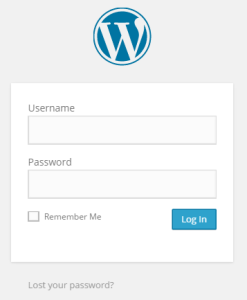
    You can login to WordPress usually at your admin domain which should look something like www.yourdomain.com/wp-admin.  Most admin pages by default are at the “wp-admin” of your domain.  The login screen should look something like this.

    How To Write a WordPress Post

    You should have gotten an invite via email from your webmaster or after your WordPress install giving you your login and password.  If you forgot your password, there is a “Lost your password?” link where you can ask to have it emailed to you.  Make sure you check any new emails you have that are associated with your domain, your webmaster may have set you up a new email and it may be over there instead of on your personal Gmail or Yahoo account.  If not, you can always ask.  Also, you may have a WordPress account dedicated  to you that is separate from your webmasters account or you may be sharing the same account as your webmaster. It really depends on the situation.

    Create a New Post

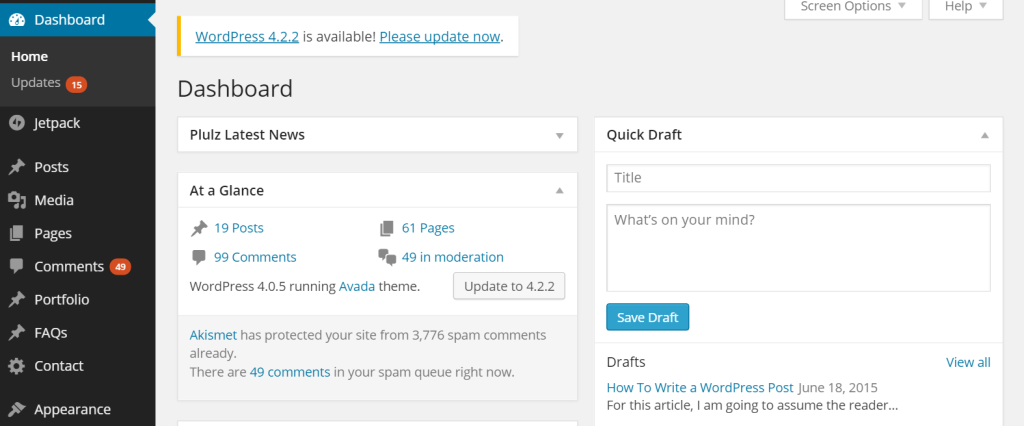
    After you login, you will see a screen that looks similar to this. Ignore all the software upgrade appeals, I can go into the best way to upgrade another day. But for now, click on the button on the left hand side menu that says “Posts”.  Too easy.

    How To Write a WordPress Post

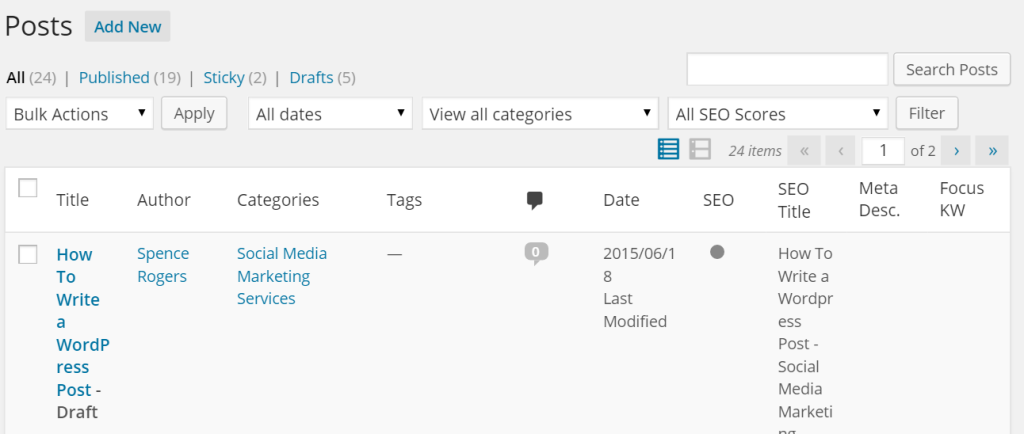
    Once you click on posts, you will see something that looks like this.

    How To Write a WordPress Post

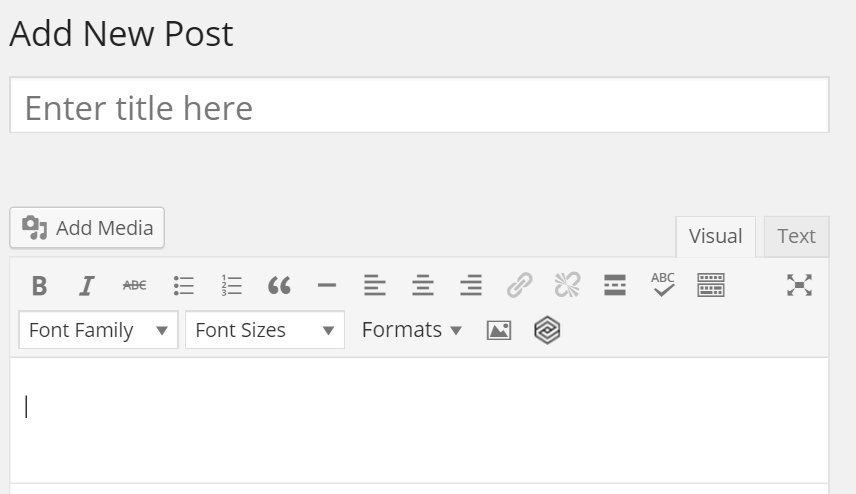
    Click on the button in the top left of the screen called “Add New”. It is write next to the “Posts” heading, you can’t miss it. When you add a new post, the screen looks like this:

    How To Write a WordPress Post

    Pick a Title

    In the title section shown in the above image, write down your title.  First you need to pick a title that is good for search engines, good for people searching for your article, good for social media, and sums up your article pretty well. So for example, this post is called “How to Write a WordPress Post”.  It is pretty self explanatory and Google knows what we are doing, the reader knows what we are doing, social media will be able to tell what we are doing, and it does a good job summing up what the post is about.  This page will hopefully do well over time because people can find this article well based on the title.

    When writing your title, you want to be consistent with your capital letters. Some people capitalize every single word. Some people capitalize the first word.  I like to capitalize every word that is over 3 letters.  It all depends, but you have to be consistent and it has to look professional so your article maintains credibility.

    One of the many benefits of WordPress is that it auto-optimizes things for you. So when you pick your title, it will automatically name your page address for this page your title. So for this article, our title is “How to Write a WordPress Post”, so wordpress named the page address “growtowinmarketing.com/how-to-write-a-wordpress-post/”.  This is very helpful for users to find your content easily and for search engines to index your page.  It is a very helpful function.

    WordPress also automatically assigns a “T1” tag to your title, which tells search engines that it is the official and main title of your blog. That is a good thing as well. The title is the most important part of the article, because so much happens when you pick it. Below is what it looks like when you pick your title. If you want to see the full address like below, just click on the part of the address and it will expand to show you like below. But you don’t need to do anything, WordPress will name it for you. This is just to show you what it looks like.

    How To Write a WordPress Post

    Pick Your Featured Image

    Your image is the 2nd most important part of the post simply because it is what people will see first, sometimes even before your title. A couple of things about images:

    Make Sure Your Image is Allowed

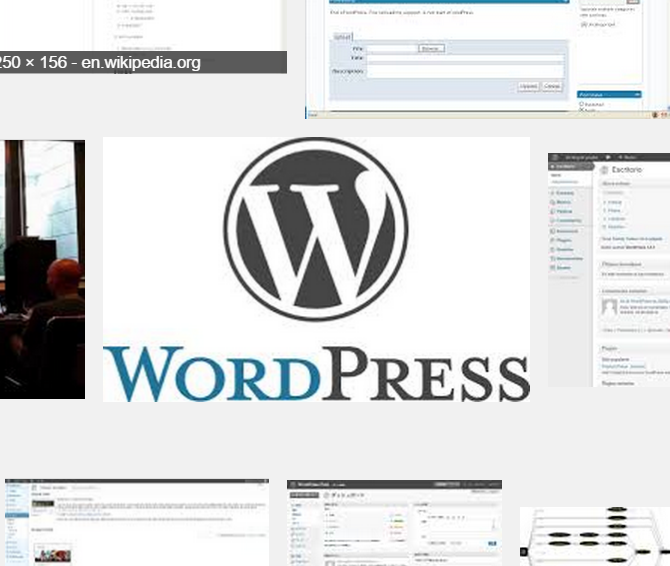
    Pick an image that you own, that is public domain, or that you have permission to use.  This used to be a big problem years ago, but nowadays with social media, image copyrights are pretty much out the window as everyone “jacks” (a friendlier term for steals) other pages images and reposts them on their page. Ironically, the page they took the image from probably just got done doing the same thing. So images are everywhere, and copyright is out the window.  But regardless, there are those guys who are into photography or who are very passionate about their images, so if you take one from somewhere, it is always best to ask.  It is also always good to link to the page if you used an image, it can’t hurt to give someone credit.  One great place to find images is “Google Images”.  If you search in Google Images the following “site:wikipedia.org” followed by your keyword request, you will get a lot of public domain images that can be used.  Wikipedia is a great site for free images. So here is an example, search” “site:wikipedia.org Wordpess”.  You get a bunch of images.  One I thought looked pretty good was this one:

    How To Write a WordPress Post

    Make Sure Your Image is High Resolution

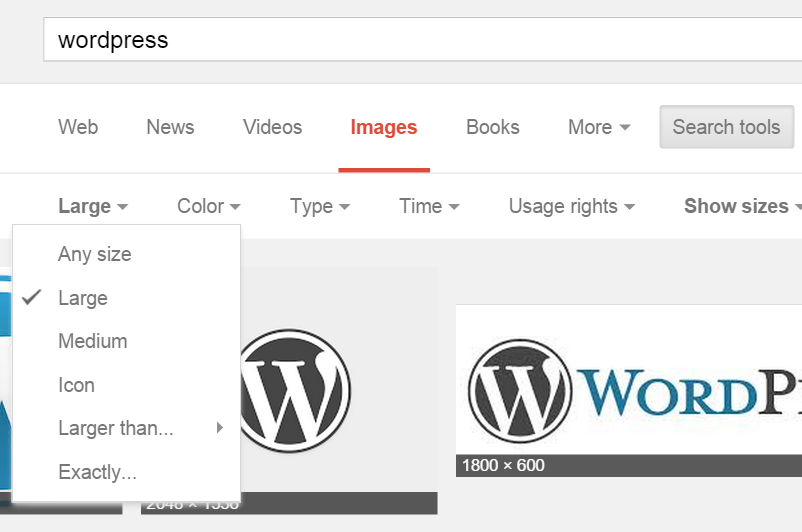
    However, I noticed that this image was only 500 pixels wide, so I didn’t use it.  I want to try and get one that is a little more high definition, so I think I am going to look for the WordPress official logo since WordPress probably wouldn’t mind me using it.  I am writing about how to write an article on their platform and I am using their platform to write it. So I think we are good-to-go. So I went back to Google Images and searched just “WordPress”.  Once there, I clicked on the “Search Tools” button in Google which opened up a menu. Then on the far left I clicked “size”, which gave me the option to choose only “large” images.  This will make sure I am looking at nice high definition images.  I then found a high resolution image that was over 1000 pixels wide.  The one I found is the one you see at the top of this article. Notice the drop down menu below where I selected “Large” for image size.

    How To Write a WordPress Post

    Make Sure it is the Right Dimensions

    You don’t want a square image going into a place where the dimensions are supposed to be a rectangle.  It won’t look right. So you want to try and make sure the image is wider than it is tall so that it can nicely fit on your blog.

    Optimize and Upload the Image

    When you download the image you want to use, go to your computer and rename the image to the title of your article.  So the image we found in the above explanation is called the title of this post, plus the number 7 just because I like to number my images as I use them. But the words are more important than the number.  This is to help you with Search Engine Optimization.  It helps Google know more about what your article is about when the image is name properly. Here is what it looks like on my computer before I upload it. I renamed the file name on my computer to “How to Write a WordPress Post 7”.

    How To Write a WordPress Post

    Now, in order to upload it, click the “Set Featured Image” link on your post creation page. It is on the right hand side somewhere and should look something like this:

    How To Write a WordPress Post

    Once you click on that, then a pop up window will show up. When it opens, click the “Upload Files” tab.  Then click the “select files” button to upload the new image you downloaded previously.  Your image should be named the name of the article as mentioned before.  Below is what the upload screen looks like.

    How To Write a WordPress Post

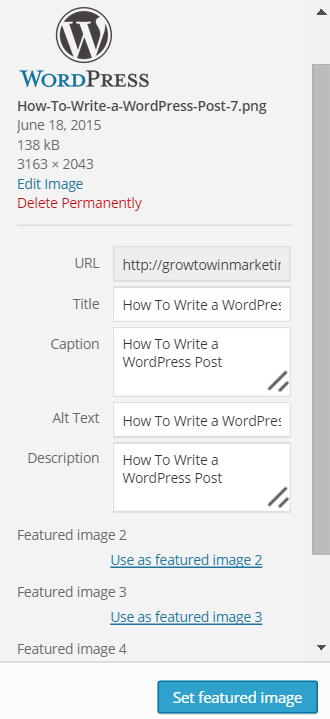
    Once you upload it, you will get a screen where you can see the image attributes. I always copy and paste the image title into the Title, Caption, Alternate Text, and Description.  That way you get even more search engine optimization (SEO) on your image.  This isn’t essential, but it is just a good SEO habit and it has helped in the past. It doesn’t take much time to do.  Here is an image of it:

    How To Write a WordPress Post

    Once ready, click the button that says “Set featured image” and your image is now ready to go.

    Write Content

    This is the main part of the article…  This is the one where you let your writing juices flow.

    Write for the Reader, not for Google

    Once thing to consider is this section is that you want to have a flow and a point to your article. If you can provide some kind of technical information, some kind of know-how, or some kind of analysis about whatever you are talking about, it will help. You want people to find value in what you are writing.  If it reads poorly or is hard to understand or just plain isn’t interesting, it won’t do well for you overall. It will hurt your brand and it won’t help you in the search engines. You also won’t get valuable feedback from people on social media when you post it, because the article didn’t do much for them.  So that is the first point.

    Use Heading Tags (H2, H3)

    If you notice, this article has a bunch of headings and subheadings. The main title is called an H1 heading. You only want one of those, and WordPress handles that for you. But you want to at least break up your content with some other headings to help the reader find their way around. It makes it easier on the eyes. It also help Google know what your site is about. Google used to put a lot of weight on the subtitle tags – they have backed off a little but it still helps with relevancy in Google search. So use them. Where do you go to set those tags?  In the title bar above the post there is a drop down toolbar button that looks like this:

    How To Write a WordPress Post

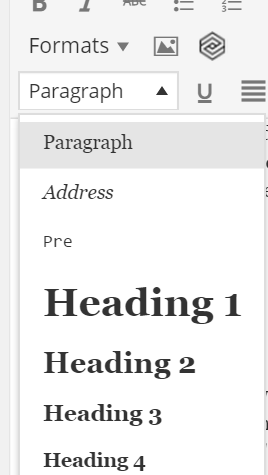
    Click that button, and you will see a bunch more buttons and a drop down menu come up.  Click on the drop down menu.  It should say “Paragraph” with a white background. That is your default font setting for your text. But to change something to a Title Tag, you can selection “Heading 2” and “Heading 3”. Again, I wouldn’t use “Heading 1” because you will confuse people and Google, that should be reserved for your blog title, which is automatic. Here is what the drop down menu looks like.

    How To Write a WordPress Post

    Use In-Text Images

    As you can see in this article, there are a lot of images. Readers like pictures. So does Google. So if you have the time and it will improve the quality of your article, add more pictures. The best way to add them in the body of the text is to put your cursor in a spot where you want the image, then go up to your toolbar above (same place where the Headings are) and click on “Add Media”. From there it is the same as when you did the Featured Image above. So just upload and select your image. You can also resize it or add search engine text to it to help with relevancy.  I always do, but again it is based on your patience level and time requirements.

    Here is what the “Add Media” button looks like.

    How To Write a WordPress Post

    Add Outgoing Links

    If you are talking about something that relates to a company or another website, it may be a good idea to link to them. This is good business and good for SEO.  The only time I would not link to a website is if it is questionable or has a bad reputation. If you can link to some high visibility sites, especially if they relate to your post, go for it.  To add a hyperlink, mark the text you want to hyperlink, then go to the toolbar and click this button.

    How To Write a WordPress Post

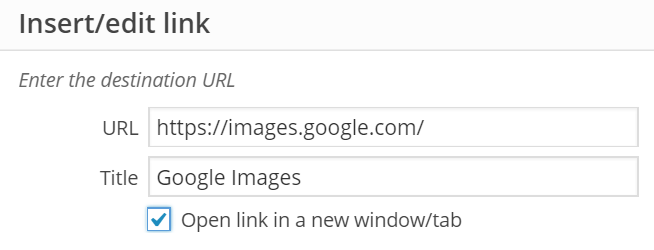
    Then this pop up window will come up.  Fill in the link and make sure if you have time to put the title of the link. This is helpful to the reader and helpful to your SEO with Google.  I usually have external links open up in new window so I check the box in the picture. But sometimes it is not needed.  Also, if you link to pages on your own site, you don’t need to check it.

    How To Write a WordPress Post

    Justify and Align Images and Texts in Post

    If there is something that is meant to be centered, center it. Here is what the center button looks like.

    How To Write a WordPress Post

    If there is text that should be justified on the right and left side of the article, you want to hit the justify button.

    How To Write a WordPress Post

    How you justify your page is your call, but it is a good idea to do it if you think it will make the post look better.

    Pick One Category

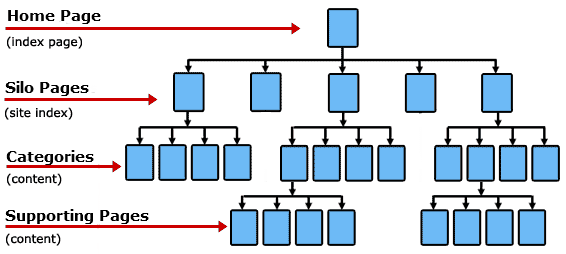
    One other great thing about WordPress is that it lets you pick categories. You can pick as many categories as you want, but the purpose of categories is to organize your page from the top down, and not be lateral. That is why I say to pick only one category. Also, Google will only give you credit for one, so you want to pick the best one so Google doesn’t get confused. You want the site structure to be solid for Google.  So this is what I mean by top down categories.

    Wordpress Categories Tree SEO Google

    Image from: Themezoom-neuroeconomics.com

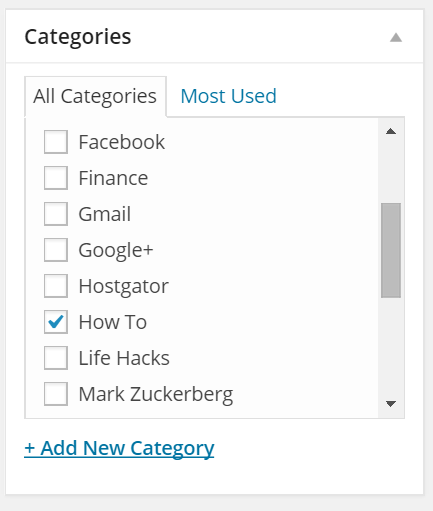
    So when you pick one category, you help your site structure. To pick your categories, go to the right hand side of your post page and find the section called “Categories”. See below for what it looks like.  Since your page is probably new, you have to pick a category from scratch. To do that, just click “Add New Category”. So it is up to you what your main categories will be. If you have less than 10 posts, my suggestion is to try to start out with 2-3 categories. Don’t overdo it or your site will spread too thin and won’t do well for the reader or Google. For this article, I picked “How To” as the category.  I may change it later, but for now that will do.

    Wordpress Categories

    Pick 3-5 Relevant Tags

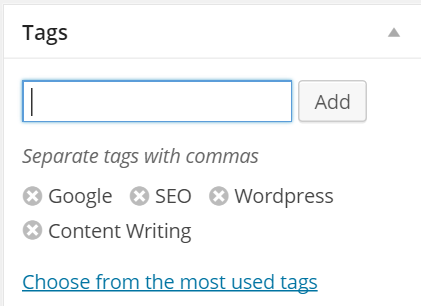
    Tags are like hashtags on Twitter or like the index page in a book.  But you don’t want to overdo it.  You want to pick 3-5 high-level topics that your article covers. So for this article, we are going to pick “WordPress”, “Google”, “Content Writing”, and “SEO”. Those are relevant and will do nicely. To pick your tags, go to the right hand side, generally under or just above your categories section.  Here is what it looks like.

    Wordpress Tags

    If your company is a niche industry, doing categories and tags right is going to be like SEO gold for your business.  Especially if other companies in your industry aren’t very knowledgeable about blog writing and SEO.

    Preview and Reread Your Post

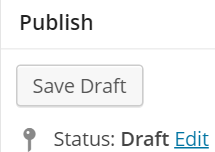
    Nothing is worse than writing a post and noticing formatting or spelling errors later on.  You want to prevent this as much as possible.  You want to see what your post looks like. So preview it.  To do that, click the preview button at the top of the page above the toolbar. Make sure you save your work first just in case. Here is the save button, which is on the top right of your page:

    Wordpress Save Draft

    Here is what the preview button looks like:

    Wordpress Preview Post

    Publish Your Post

    Make changes and tweak your post.  Then, once done, click publish. But you are not done yet. The publish button is on the top right of your post editor page. It looks like this:

    Wordpress Publish Button

    Promote Your Post for Free

    Once your post is published, go to Bitly.com and shorten your url so that it can be used on social media effectively.  Go to your Facebook, Twitter, Linked, Google+, and any other sites you are on to post your new article using your new shortened url from Bitly. Make sure to write a good explanation or catchy reason why you are posting it that is different than the title, because the title will automatically be there anyways in the social media preview.

    Respond to Feedback

    Once your post is written and promoted, you may get comments about it on social media or under the post itself in the comments section.  It is important to respond quickly in order to encourage feedback. Or you may get a negative comment from a disgruntled customer or employee, you will want to monitor that and handle those accordingly right away.  If you write about controversial topics like religion, politics, or social issues, you will definitely fire up the feedback which you won’t want to miss.  Your post is now live, and it has been disseminated to your audiences.  Checking for comments and activity for about 24 hours maybe 3 or 4 times is about right.

    You Are Ready

    This may seem like a lot of steps, and some of them may seem unnecessary. I know bloggers who don’t even put images on their blog.  It is all what you want to do. I explained what right looks like and I happen to follow my own standard of a blog post.  So if you train yourself to use this formula, I can guarantee you won’t be disappointed over time. Your articles will do well in search in the long run and your readers will thank you for the good formatting. If you are doing things right, you are sure to get some business out of it. It is a win win for all.

  • 10 Smart Phone Apps Business Owners Should Use

    10 Smart Phone Apps Business Owners Should Use

    It is impossible to maximize your business without a smart phone these days.  There are a lot of apps you can use to help your business, and there is no way we can list them all. But in this article I try to list my top ten apps that really help me with my business.  I can say without question that I use each and every one of these apps on a frequent basis and each one helps me by making my life easier as it relates to my business.  If you haven’t at least experimented with these, I highly recommend at least giving them a try.

    Gmail

    By now almost everyone has a Google account of some kind. Well, chances are you also have a Gmail account. If you do, I highly recommend running your email through Gmail or Google Apps for Work and using the Gmail App on your smart phone. You can configure Gmail to handle multiple Pop3 accounts and email people from many different email addresses. If you are like me, you have a personal email, a business email, and several other emails of some kind. All of these can feed your Gmail App and you can stay connected with your emails on all your devices. Gmail has great organization features and add ons. It integrates well with almost every important CRM and business application out there.

    Download Gmail from Itunes

    Download Gmail from Google Play

    Chrome Browser

    You can download the Chrome Browser on any smart phone. What is great about Chrome is that it maintains your bookmarks seamlessly across all your devices. It also maintains your passwords very well. Chrome also has a data saver option that automatically compresses web pages and save your data plan for your phone.  When you go back to your desktop, you can use Chrome and it has a ton of extensions and integrations that will help you as a business owner. I love Chrome on desktop and would be hopeless without all of the extensions. So on mobile it compliments my desktop activity well.

    Download Chrome from Itunes

    Download Chrome from Google Play

    Facebook

    This is self explanatory, but it is still worth mentioning.  Facebook is probably the most important and useful app I have ever used and is the largest social network in the world. You can keep in touch with family, friends, clients, brands, and anyone or anything else that is out there. You can also keep up with current events, run your company Facebook page, and keep an eye on competitors Facebook pages. You can keep track of events going on in your area as well. It is just a great app with endless possibilities!

    Download Facebook from Itunes

    Download Facebook from Google Play

    Twitter

    A lot of businesses have made the leap to Facebook, but not all have gone over to Twitter. Twitter is such a powerful tool once you get it.  You can Tweet top influencers in your industry. You can Tweet hash tags.  Any time you put out a new product, update, picture, or article Twitter is a great place to put it out.  If you stay active on Twitter you are bound to grow 10 to 20 new followers a day.  Twitter is also very good for Search Engine Optimization.  With only 140 characters, it is great for business owners who want to put out short sound bite updates.  One other thing I like about Twitter is that it has a lot of integrations. So many platforms and services work well with Twitter and it is such an asset in marketing.

    Download Twitter from Itunes

    Download Twitter from Google Play

    LinkedIn

    I get a lot of my business news and professional tips from LinkedIn. I follow all sorts of people in my industry and companies who can help me get better at what I do. I also get a ton of people reaching out to me on LinkedIn.  I get a new lead or business connection on average every 2 days. It is a steady stream and the people who reach out to me are really helpful to what I am trying to do.  If you stay active on there, post articles and updates, endorse people, like and comment on posts, it really pays off. There is a good balance on LinkedIn. If you check it once a day and do a few things on there for 5-10 minutes it will really help you in the long run.

    Download LinkedIn from Itunes

    Download LinkedIn From Google Play

    Instagram

    Instagram is probably the best social media photo app out there. It is a booming social network with over 300 million active users.  It has amazing photo filters. It uses hash tags that are very effective. It is great for branding. You can check into events and locations. When you post a photo to Instagram, it can cross post to Facebook, Tumblr, Twitter, Foursquare, and Flickr.  You can always tell who uploads photos from Instagram to Facebook, the images always look very nice because of the filters applied to it.  There are people who have made a lot of money on Instagram, especially if their company is product-based.

    Download Instagram from Itunes

    Download Instagram from Google Play

    Todoist

    I spent a good amount time finding a good task-manager app where I could quickly write down tasks I need to get done, but then also organize them by due date, priority, category, and tags.  Todoist ending up beating all of the other applications after my testing period.  It also integrates well with other applications and you can tell their development team is dedicated to keep improving the platform. You can use Todoist on desktop as well as mobile.  I highly recommend checking it out and using a task app to help you keep track of your many requirements.

    Download Todoist from Itunes

    Download Todoist from Google Play

    Evernote

    Evernote is a note taking tool that has a lot of integrations with other software and platforms.  I use Evernote to keep track of my long drawn out brainstorming notes that are too long to put on a task list, and are too random to write in an actual document.  I have a note created for checklists of things I don’t want to forget that are too many to list on a task list. You can use Evernote to create notes for brainstorming projects or brainstorming possible scenerios and courses of action you may be thinking about taking.  You can then check your Evernote when you get on your PC or Mac and everything is there. It is a good addition to your phone so you can be more productive and record your important requirements.

    Download Evernote from Itunes

    Download Evernote from Google Play

    Google Analytics

    Google Analytics tells you in real time how many people are on your website. Of course your webmaster is going to have to configure your website for Google Analytics. But once it is configured, you are going to want to know who is coming to your website and when.  It tells you how many people are coming coming to your website from your social media sites, from search engines, and from other referral sites. It tells you their location data, what pages they are browsing, and how long they are spending on each page. This app is critical for a business’ online awareness.

    Download Google Analytics from Itunes

    Download Google Analytics from Google Play

    Klout

    Klout is a great tool to track your social net worth. It keeps track of your Klout Score, which many people use to see who are influencers in their industry. My Klout score is 63, Barrack Obama’s is 99, Walmart’s is 90, and Simon Cowell’s is 88 to give you an idea…  The average Klout score of all users is around 40.  Klout has great content recommendations based on the categories you choose to list on your profile.  The goal should be to always improve your Klout score. If you have a high score, you will get more people following you and reaching out to you for things. Plus it garners you real “klout” from people that are tech savvy.

    Download Klout from Itunes

    Download Klout from Google Play

  • 5 Steps To Get Your New Website Indexed Online Quickly

    5 Steps To Get Your New Website Indexed Online Quickly

    First let me explain what this is not. This is not what you do to get your website to rank high in a search engine. These steps are just to get your website indexed so that you have an initial legitimate online footprint so that search engines notice you. Without these steps, search engines will not even see you and it will be a lot harder to get your website noticed.  This is the first step. Then, once your website is indexed, we can see how it ranks naturally – it may rank in the top 3 just on its own over time (give it 6 months).  From there, if it isn’t ranking well, we can modify the on page and off page SEO strategy accordingly to make the website do better.

    Submit Your Website to Google

    When you first set up a website, you want to tell Google. Google is the largest search engine in the world, and when Google notices you, it is surely going to help put you on the map.

    Go to Google Website Submission

    Submit Your Website to Bing

    Bing is the main competitor to Google and is the 2nd largest search engine in the world. It is easy to submit your site to Bing and worth doing.  Yahoo uses Bing so when you submit to Bing it will go to Yahoo as well.

    Go to Bing Website Submission

    Submit Your Website to Submit Express

    You already submitted your website to the main two search engines manually. Submit Express submits your websites to 70 different search engines which is a good way to save time.  It is bad to submit your website to where it is blasted to the four winds of the internet, which could get your Google penalties. However, these are search engine submissions and are not “do follow back links” per se.  All this is doing is ensuring a wide range of the medium and smaller search engines notice and index your site. Submit Express is the Top Ten Reviews submission engine 1st place winner for 2015.

    Go to Submit Express Submission

    Submit Express also has a much bigger submission service where you pay them to submit to over 20,000+ search engines and directories. Submit Express, who specializes in SEO services, also vets each of these search engines and directories to make sure they are legitimate and do not violate any Google penalties.  While this is probably a good thing to do, we do not recommend this service to get your website indexed. The other steps we outline in this article are enough to get your website indexed.

    Create a Facebook Page

    Facebook is the largest social site in the world. It has a huge impact in Google, Bing, and Yahoo! search results.  Although none of the links that come from Facebook are “do follow”, the initial link you can create on your new Facebook page to your website will help the website get indexed. Facebook also has its own search that is searched millions of times a day.  When people search for your company brand or keywords similar to your company, your Facebook page will come up. Go here for some more Facebook SEO tips.

    Create a Facebook Page

    Create a Twitter Profile

    You should create a Twitter profile for all the same reasons you should create a Facebook Page. Twitter is the second largest social site and Twitter will help your page get recognized both on the Twitter platform and around the web.

    Create a Twitter Profile

    While there are a million more tasks one can do online to get noticed and generate buzz, these steps above are a great start to get you indexed.

  • 11 Ways Competitors are Beating You on the Internet

    11 Ways Competitors are Beating You on the Internet

    The internet is evolving so quickly, that no one company completely understands or has the expertise or time to master the highly-complex digital landscape. There was once a time when having an HTML website and a Facebook page was good enough. But now there are a million things one must do digitally to even be competitive. It is an endless list and it is up to the business itself to prioritize which digital tasks must be done first.

    Businesses should not look to large marketing agencies that have been around since the dawn of time. They will tell you the age-old techniques they used when people still read print newspapers and when people still sent email forwards to put out information to their friends and family. Instead, businesses should look for companies and people with innovative ideas on how to reach customers in a new, dynamic way. Things are changing, and companies that get that will be able to survive along side those changes.

    So this brings us to the point of the article. What are your competitors doing that you aren’t? There are a lot of things. And many of your competitors won’t broadcast them to you. So I posting some possible ideas here that I have seen be successful with our clients and with our clients’ competitors.

    They Are Growing Audiences Continually

    Take a look at some of the bigger companies in your industry. They are growing their Facebook, Twitter, Google+, LinkedIn, email lists and others to thousands if not tens or hundreds of thousands of followers. Growing your audience gives your company the RIGHT to talk to someone. Audiences are an asset, that can be harnessed when you want to put out a press release, when you want to announce a new product, when you want to leverage their buying power during bad economic times, or just when you want to engage with your customers. Audiences are critical. Large highly targeted audiences are no longer a nice-to-have, they are a necessity. And your competitors are growing their audiences each and every day by the thousands.

    They Are Collecting and Analyzing Data

    Your competitors are collecting data on you, other companies in their industry, and on their customers. They have executive level dashboards that tell them what is going on across their industry in an easy to read format, who is being engaged on social media, who is ranked high in Google and for what keywords, who is buying ads on what platforms, and a slew of other data points. They know the age, sex, zip code, interests, and buying habits of their customers, prospects, and engagers. On top of that, they are using this data to make sound business decisions and marketing decisions. They know their ROI (return on investment) for a certain kind of marketing spend and they know their rates (CPM, CTR, CPC) on all the marketing platforms. They know their web traffic stats and which sites are referring them. If your company does not know these data points, it may be a good idea to learn it.

    They are Building Predictable Models

    Your competitors have taken all of the data they have collected, paid a marketing firm or a data science firm, and have several models that tell them when, what, where, and how to sell something for the biggest bang for the buck. They know how many catalogs to send to get a wealthy father of 3 to buy XYZ. They can predict how much they will make monthly when they spend a certain amount for a specific product. This is because they have predictive models that allow them to plug in the data and output a prediction. It isn’t always 100% accurate, but it is a lot better at helping executives make decisions than the “finger in the air method” or the “hunch method”. Chances are small and medium size companies are not building models yet, but they should be. It is the way of the future that works and will help you overcome your competition.

    They are Trolling You and Hurting Your Reputation

    Whether knowingly or not, they are going on social media, review websites, and forums talking about your product or service in a negative way. They build complete websites designed to look like third party objective review sites that say their product is either better than yours, or they leave your product off the lists completely. They are going on Yelp, Foursquare, Google Local, and Facebook leaving a 1 star rating with some snide remark. They thumbs up all the negative comments left by someone, or they make a negative comment themselves. Sometimes it is a paid staff that does this, sometimes it is employees of a competitor that are mad they are losing sales to you, sometimes it is a disgruntled ex employee or a ticked off customer who didn’t like the way a customer service rep of yours talked to them, and sometimes it is the owner of the company talking bad about you indirectly or directly. Not saying that you need to do these things, but your company should empower your employees to defend you on these sites and there should be an environment that makes it easier for customers and employees help your reputation against the attacks of a competitor. Of course marketing companies like mine can help with online reputation management as well. There are tricks of the trade that need not be mentioned here, but something can always be done to help your particular situation.

    They Are Part of the Social Conversation About Seemingly Unrelated Topics

    Scroll through some of the posts of successful companies on Facebook. They are a part of the political conversation. This is in part because they want to push an agenda that helps set the conditions for their industry. But also because taking a stand on an issue generates buzz and PR. One must be careful not to undermine their brand or business model by alienating too many people, but being political or commenting on newsworthy topics is now an accepted practice. And with the 24 news cycle, people will forgive you if there is something they disagree with. A couple of recent examples are when Mark Zuckerburg commented on internet privacy, or when Kroger took a stand on the 2nd Amendment, or when Mark Cuban commented on tax inversions. Sometimes these things generate new customers, followers, and buzz and work out really well. Your competitors know which news, current events, and political topics they want to engage on, and are doing it.

    They Are Hiring Better People Because of Digital Solutions

    Recruiting has gotten highly sophisticated and fragmented these days. If your company isn’t recruiting across a wide range of websites and job boards, you could be missing some great candidates. The data suggests that a lower barrier of entry when hiring means that you will get a wider candidate pool. Companies that take advantage of the 1 click hiring processes out there like Zip Recruiter and LinkedIn, instead of making people fill out forms and forms of data, are getting more qualified candidates. Companies that are paying for executive search firms and paying for recruiting services are getting better candidates. If your company is still recruiting the old fashion word-of-mouth way, it may be time to think digitally and open up the pool to the rest of the nation and the world, because your competitors sure are.

    They Are Raising More Capital

    Competitors are taking full advantage of the digital space to raise money for projects, research and development, and expansion. Kickstarter, Indiegogo, GoFundMe, and other crowdfunding sites are opening companies’ access to capital. Then you have LinkedIn, Angelist, and Crunchbase that help businesses and start ups link up with qualified investors. It truly is a dynamic space out there and if the trip to the local bank is all a company is doing to fund an expansion, they are missing out on this critical component of generating capital. Competitors that do this are getting all of the money, instead of sharing some of that market share with you.

    They Are Everywhere Digitally

    Any successful brand, company, or public figure goes to the places where their clients, customers, and supporters hang out. In the digital space, these different social sites, blogs, websites, and forums are just like a “room” or a “place” where a potential supporter spends some or a lot of their time. It is important for companies to be present on the 30-40 places that matter. Not only that, it is important to have some level of engagement on those sites, don’t just leave them stagnant. Competitors are doing it. Every industry I have evaluated has a handful of companies that dominate the entire social and web space. And it isn’t always the Fortune 500 or 100 companies. Sometimes it is just a tech-savvy marketing department or a hired marketing firm that has done it for them. This is something that needs to be considered.

    They are Generating Constant Content

    Videos, images, posts, and articles are constantly flowing throughout their website and social space. They are considered the subject matter experts on whatever they are talking about, and naturally people want to buy from them. They give you free advice or make you laugh or impress you, so you go to their website and see what it is they do. They have a system and it is like a well-oiled machine. They have a video person to film and edit videos, they have a photographer to take pictures, they have writers and editors to write content. They have graphic designers and Photoshop experts to make memes and logos. They either have a massive staff of 10-50 people handling their content or they have outsourced it to a marketing firm. Either way, they are winning and dominating and will continue to dominate because of the widely fragmented social and content space.

    They Understand Proprietary Marketing Techniques

    There are about 20 or so proprietary marketing techniques that just aren’t written about. Companies that don’t have an experienced digital marketer on staff or have not hired a marketing firm just won’t get close to what these 20 untold techniques are. But rest assured, somebody is using them and they are running circles around your company in terms of marketing ROI, reach, engagement, and lead generation. It is important to seek out people that know what they are doing and hire them as a consultant or hire them to actually perform these tasks for you so you can beat your competitors.

    They Have Gone Mobile

    Their website is mobile friendly aka “responsive”. Their contests and landing pages are mobile friendly. They may have a mobile ap so users can engage with them separately from the rest of the web, while gathering useful data on their users, and while sending push notifications at key times or when their customers are nearby. They are targeting mobile users with ads. They send out mobile-friendly coupons and tickets. They are completely there while others are nowhere to be found. Is your website mobile friendly or was it made 10 years ago before mobile devices were as prevalent?

    Please feel free to reach out to me or comment below if you want to talk more about these topics.

  • Questions to Ask Your SEO Company to Save Headaches and Money

    Questions to Ask Your SEO Company to Save Headaches and Money

    I am going to tell you want questions to ask your SEO Company, or a company you are thinking of hiring. These questions will help you gauge whether or not you are going to get your money’s worth out of them.

    Background On SEO

    SEO is very, very hard to do. Especially since the world’s largest search engine is in direct competition with search optimizing firms. They want the cost of providing SEO services to be so egregious that you will save more money going through their pay per click portal called Google Adsense.

    Recently Google decided that videos are no longer going to rank for what they used to. Because of this, entire companies that based their content marketing strategies around videos lost a tremendous amount of traffic overnight.

    Also, recently Google decided that Google Authorship, where your picture is displayed next to the article you wrote in search results, is no longer. Google Authorship in the search results went away just like that. And this happened just a few weeks ago. Authorship still plays a role, but not as prominently displayed as before.

    Then, companies that ranked very high for local services like lawn mowing, plumbing, lawyers, doctors, etc. recently found their SEO world turned upside down because of Google’s Pigeon algorithm (implemented in July of 2014). This algorithm is designed to ensure the best results locally come to the top. This is a good thing, but not necessarily a good thing for companies that were already ranked high and now have to adapt and overcome these new challenges.

    Principles of PageRank
    Principles of PageRank (Photo credit: Wikipedia)

    Question 1:  What is Google Pagerank?

    A typical answer should sound something like this. Google Pagerank is a numbering system assigned by Google to websites on a scale of 1-10. It is named after Larry Page, one of the founders of Google. It is on the exponential scale, meaning that a Pagerank of “2” is 10 times more in rank authority than a Pagerank of “1”. Pagerank increases on your website when a website with a certain Pagerank links to your website. Pagerank is specific to domains and specific to pages. There are certain pages with no Pagerank because Pagerank is specific to pages and not necessarily domains. Pagerank is just one metric in Google’s overall algorithm of hundreds of data points. There is talk of removing Pagerank in the future, but that is unlikely since it is a great distraction for people trying to do SEO to focus on and it helps Google find spammers trying to the game the system by pointing too many links to their sites.

    Question 2: What is the difference between a “dofollow” link and a “nofollow” link?

    Answer: A dofollow link is a standard link and passes Google Pagerank from one site to another site. A dofollow link also tells Google that you are associating your page with the page you are linking to. A nofollow link does not pass Pagerank and does not associate your page with another page. A nofollow link still affects the other page by sending Google signals in its algorithm, although no one knows how prominent or how important those signals are and what they affect.  I suspect it could be relevancy signals. Nofollow links do also dilute other dofollow links on the same page. For instance, if you have 4 dofollow links and 1 nofollow link, each of the dofollow links only pass 1/5 of the Pagerank because the nofollow link takes up one of the 1/5 Pagerank even though it doesn’t pass Pagerank.

    Question 3: Who are my main competitors online, what are they spending on pay per click ads, what are their top keywords, what is their Pagerank, and how many links are pointing to their site?

    Any SEO with basic SEO experience should be able to easily with a few clicks of a button do decent competitive analysis. They should be able to tell you very close answers to the above questions. If they can’t, you are probably going to waste a lot of money on them.

    Question 4: Should I use an article submission service for back links?

    If they say yes, fire them immediately. You don’t want to submit your articles to the be blasted all over the world wide web. If you article ends up in too many places with the same anchor texts, it can penalize your page and your website will get deranked from Google’s search until you clean up all the bad places the article went.

    Question 5: What are the main Google algorithm updates and what do they regulate in Google’s search results?

    If your SEO can’t rattle these off and explain what they mean during an interview, then how can they know how to properly implement an SEO strategy on your behalf?

    Panda:

    Designed to reduce web content spam and low quality content by replacing them with higher quality content in the search results. Targets scrapers and content farms that add very little real content.

    Penguin:

    Targets link spam and websites that are trying to manipulate the search results artificially through linking schemes. Quickly identifies those websites using linking techniques that clearly violate Google’s webmaster guidelines.

    Pigeon:

    An improved local search algorithm designed to produce a results page more like the traditional search results instead of a bunch of local listings of local companies. So if you search “Tampa Real Estate” you are no longer going to get a bunch of realtors and their offices on a map, but instead you will get a listing of websites like Zillow, Realtor.com, Trulia, and Century 21. Google is trying to hone in on what local results people want to see and Pigeon is trying to do that.

    Hummingbird:

    Focuses on the entire meaning of the search instead of just each individual word in the search phrase. It is Google’s attempt at conversational search, the “why” behind the search, and the “what” the searcher is looking for even if it doesn’t necessarily mean exactly what they are typing in.

    Question 6: Who is Rand Fishkin?

    He is the Founder of one of the most prominent SEO websites – MOZ and is one of the main SEO influencers that any good SEO company would be able to know about. Rand is infamous for his beard and curly mustache.

    Question 7: Who is Mark Traphagen?

    This is a little harder question, but if your SEO gets it right, he/she is not only into SEO, but sends a strong signal that they understand Google+ and its role in helping your SEO strategy. Mark is one of the main SEO influencers on Google+ (with 96K followers) and is Senior Director of Online Marketing at Stone Temple Consulting, an SEO company similar to Grow To Win Marketing.

    Question 8: Are press releases good for back links to help grow Pagerank?

    If they say yes, then run as fast as you can. Press releases are good for brand mentions, getting traffic, getting exposure, and sending relevancy signals to Google. We have had some success with press releases, but not for getting back links to increase Pagerank. It is important for your SEO to be able to articulate the pros and cons of a press release, to ensure the links are nofollow, and to ensure the links are to your main homepage at the bottom of the release and not anchor text dofollow links in the body of the release.

    Question 9: Are directory submission sites good for back links?

    No. Don’t submit anything to a mass submission engine that will blast your website to the four winds. You land in too many bad neighborhoods and your site will get tanked. It is always better to submit your website individually and manually to select, relevant, and specifically chosen directories. There are a lot of factors in submitting to a directory and the wrong one can create a lot of problems.

    Chris Hooley drinkbaiting Matt Cutts
    Matt Cutts (Photo credit: Wikipedia)

    Question 10:  What is the best website platform/engine to use for SEO?

    If they say anything other than WordPress they are missing the mark.  Matt Cutts, head of Google’s webspam team recently told a room full of WordPress webmasters, “WordPress takes care of 80-90% of SEO“. Sure you can use other platforms, but the SEO pro will have to put a heck of a lot more work in to optimize the system and the client (you) will end up paying for that time. It is better to save yourself a lot of money and headache and just use WordPress. If they aren’t using WordPress to build your site, chances are they are not very SEO-knowledgeable.

  • 5 Helpful Google+ Search Engine Optimization Tips

    5 Helpful Google+ Search Engine Optimization Tips

    by Spence Rogers

    Google created Google+ with search engine optimization in mind.  That is why it is important for us to provide helpful Google+ search engine optimization tips. The social juggernaut will eventually dominate all search engine results above all other social media platforms. With the advent of Google+, the SEO techniques for webmasters changed very quickly.  Although standard on page website SEO is a very powerful platform to help your search engine ranking and SEO dreams, optimizing your Google+ page is necessary to unleash your website’s full potential.

    Google+ is much more than a social media page that you build upon to connect with people and interests.  A Google+ page is a massive platform to help you make your presence known.  To optimize a Google+ page all you have to do is keep certain details in mind and you will have a very optimized page that shows up in the search engines and in Google+’s own people search. Here are a few initial tips that will help you with your page performance.

    1.  Complete your profile:

    The most important aspect of any Google+ page when it comes to search optimization is the completion of all the personal as well as professional credentials regarding the page. An incomplete profile does more harm than good and will not be given the credibility in Google’s algorithm that more complete pages receive.

    2.  Optimize the title tag:

    Title tag optimization plays a pivotal role in helping your post rank well in Google search. A good Google+ title can take your post a long way and fetch you amazing results.

    3.  Set up authorship:

    Visuals do matter, and in this case, they can be game changers for your page. Choosing an author picture can add some valuable points to your table and help your page push through. Your posts can help you steal traffic from your competitor up the ladder if you have a catchy display picture and successfully implemented the author tag.

    4. Link it directly to your page:

    Connecting your Google+ page directly to your website definitely adds to your SEO rankings. This can be done using a simple piece of code in your webpage and you are ready to go.

    5. Get followers and +1’s:

    It is always about the numbers and in this case the higher the number of your followers the better you perform on the SEO table. +1’s also play a pivotal role in moving you up the charts.

    Optimize your Google+ Search Engine Optimization and buckle up for the ride to the top of the list.